
Who this is for
- •Exclusive pumpers from day one
- •EP moms after NICU discharge
- •Anyone managing supply without nursing
Start your free trial on iOS and log your first session in under a minute.
The problem without a dedicated tracker
General baby trackers treat pumping as an afterthought. EP life needs session counts, daily minute totals, and stash math front and center — every single day. Without a dedicated tracker, small slips compound — missed sessions, mystery bags in the back of the freezer, and no clear answer when you ask whether supply is actually dropping.
How Stash solves it
Sessions & timer
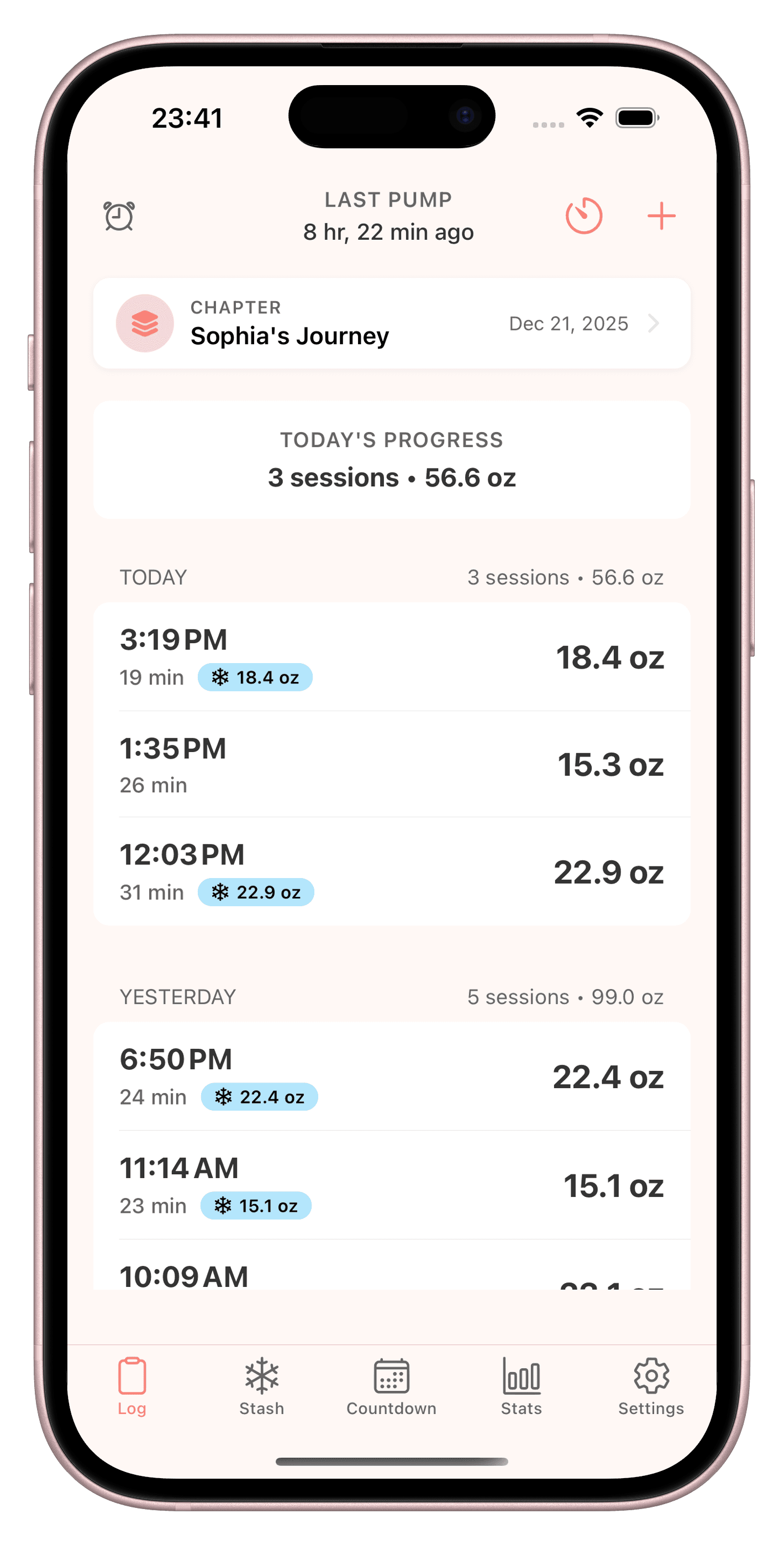
Start a pump timer or log manually when you finish late. Track left, right, or both with volume and notes — built for 8+ daily sessions.
Stop-pumping countdown
Connect daily output and freezer stash to a clear projection — know when you can reduce sessions or wean with data, not guesswork.
Freezer stash tracker
Total stash volume across freezer, fridge, and daycare — see how much stored milk you have overall without a spreadsheet.
See Stash in action
Session logging, stash tracking, and reminders — built for exclusive pumpers.
A day in the life with Stash
Your day starts with a glance at the home screen widget: next session in 40 minutes, daily output at 18 oz so far. After the lunch pump you move ounces from fridge to freezer in the app. Before bed you review the trend chart — output held steady even though you dropped one overnight session.
What to look for in a exclusive pumping tracker app
App Store listings and listicles often bury the features that matter for EP. Use this checklist — no brand names, just criteria:
| Must-have | Nice-to-have | Stash |
|---|---|---|
| Left, right, and both-side logging with optional timer | Home or lock screen widgets for next session and daily totals | Session timer + manual entry when you finish late |
| Daily and weekly output totals without manual spreadsheets | Stop-pumping or stash goal projections | Total stash tracking across multiple locations |
| Total stash volume across freezer, fridge, and daycare | Dark mode for middle-of-the-night pumps | Smart reminders and iOS widgets (iPhone-first — no Apple Watch app) |
| Reminders you can snooze when meetings run over | Export-friendly history if HR or a lactation consultant asks | Output trends and stop-pumping projections |
| Private data — no social feed or oversharing | Works offline for logging when signal is spotty | Built for exclusive pumping — not a generic baby tracker |
FAQ
Is Stash a exclusive pumping tracker app?
Yes — Stash is an iOS pumping tracker built for exclusive pumpers and combo feeders. It covers sessions & timer and when can I stop pumping without the bloat of a generic baby tracker.
Is Stash free?
Stash offers a free trial on iOS so you can log sessions, track stash, and test reminders before subscribing. Download from the App Store and try for free — not a permanently free app.
Does Stash track left and right sides?
Yes. Log left, right, or both for each session, with optional timer and notes. Daily totals roll up automatically.
Does Stash work on Apple Watch?
Stash is an iPhone and iPad app — there is no Apple Watch app. Use home or lock screen widgets to see your next session, then log on your phone when the pump ends.
Can Stash manage my freezer stash?
Yes. Track total stash volume across locations and connect it to your stop-pumping projections — especially useful if you are building stash for daycare or weaning.
Does Stash work offline?
You can log sessions without a spreadsheet or constant connectivity. Your data stays on your device with privacy-first design.
Related articles
Built for 8+ sessions a day
Try Stash free on iOS — session log, freezer stash, reminders, and stop-pumping projections in one EP-first app.
Try for free on iOS